Help centreYour team
Add your workers
Put everyone who works with you on the worker register, so screening, training and signatures are tracked.
People holds two lists: Workers (everyone who works with you) and People with a login (people with their own CareHelm login). Workers on this list don't need a login. They sign policies and send documents from their staff link.
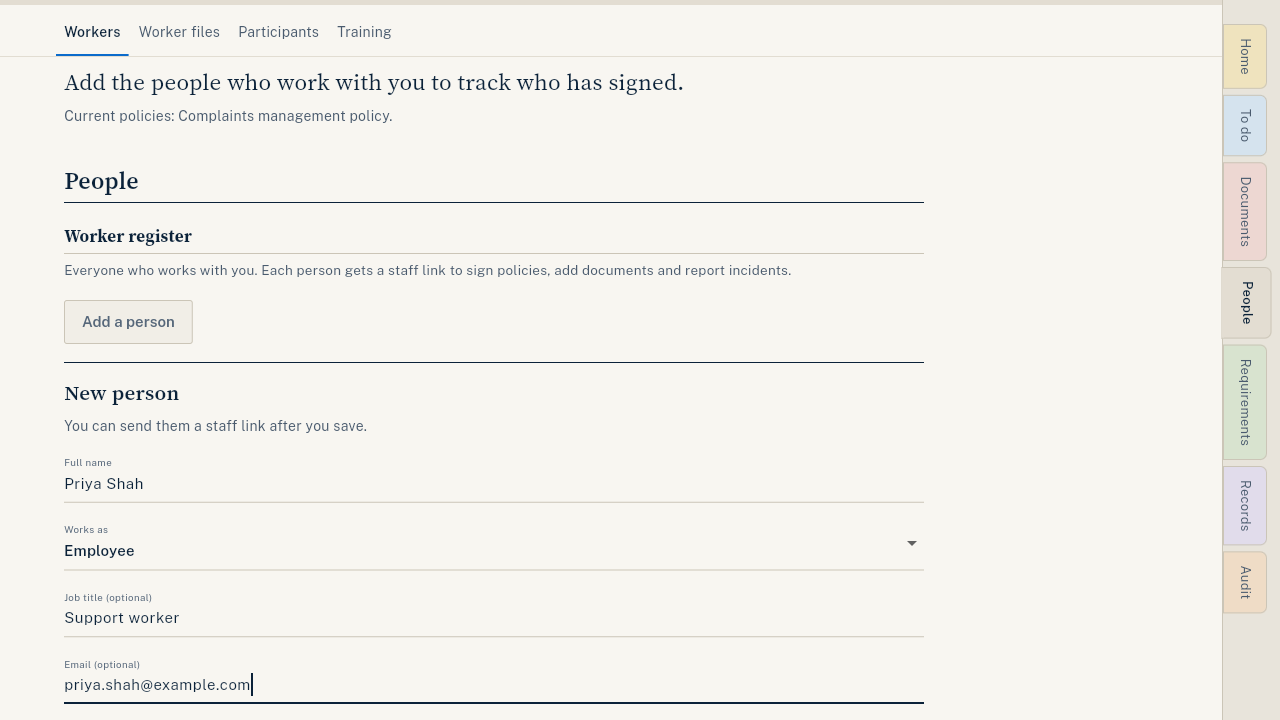
Steps
- Open People and press Add a person.
- Type their Full name. Choose how they work: employee, contractor or volunteer.
- Add a Job title, an Email and a Mobile if you have them. They are optional.
- Press Save person. Their row shows what they still need to sign.
- Send them their staff link. See Send a worker their staff link.
Good to know
- Workers on the register are free. Only people who log in count toward your plan's logins.
- Worker files (next to Workers) holds each worker's screening check and training records for your audit.
- Have a staff list in a spreadsheet? Import it. See Import your files.
- To give someone their own login, see Give someone app access.