Help centreGetting started
Answer the gap assessment
Go through each requirement that applies to you and say how far along you are.
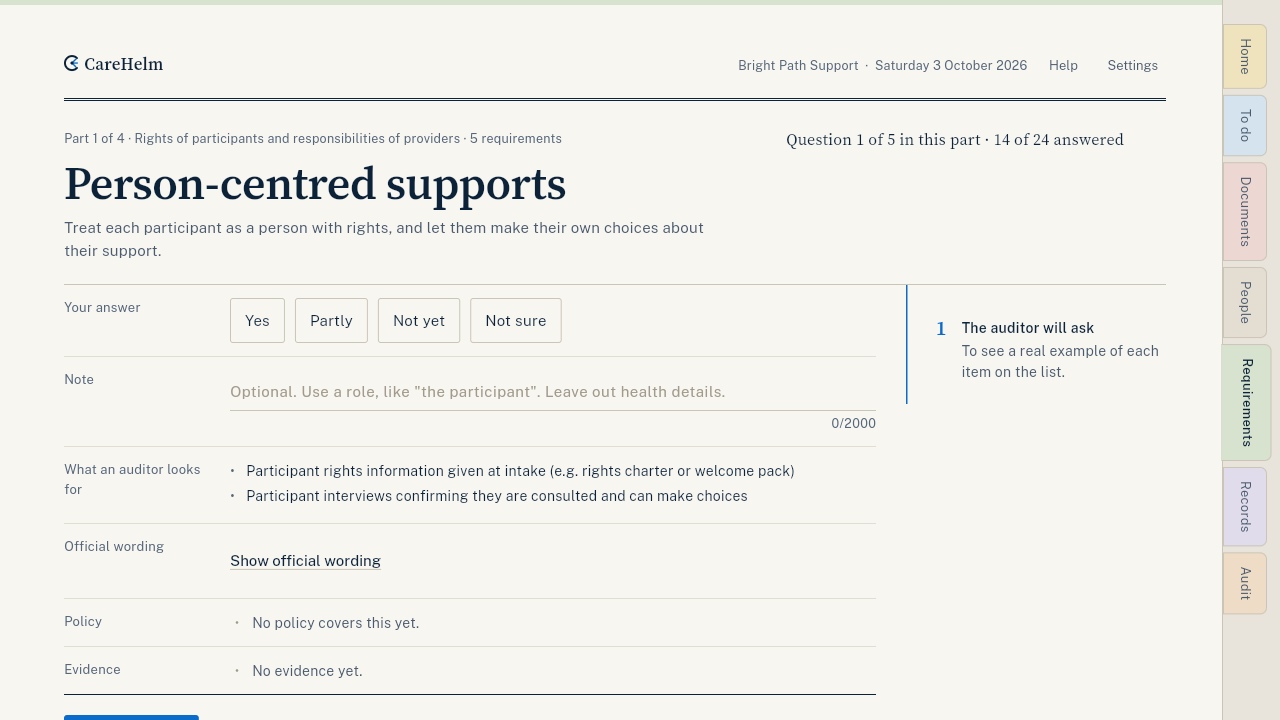
The gap assessment lists every requirement for your audit, under Requirements. For each one you read what it asks and answer it. The answers feed your status, your audit plan and your portal self-assessment draft.
Steps
- Open Requirements. On a phone it is under More.
- Pick a requirement. Start with the first one marked Not yet.
- Read what the requirement asks. Press Show official wording to see the exact text of the standard.
- Choose your answer: Yes, Partly, Not yet or Not sure.
- Add a short Note on how you do it. Use roles, like "the participant", and leave out health details.
- Press Save and next. The next requirement opens, and the top of the page shows when your last answer was saved.
Good to know
- Your quick check answers are already filled in. You mostly confirm them.
- If you imported files, some answers show Suggested from your files. Press Use this answer to accept one.
- About four minutes a part is typical.